Free event checklist
Every task for your event, on one board.
A wedding checklist, a birthday to-do list or a corporate event run sheet — start from a template or a blank board, drag tasks from To do to Done, and stop keeping the plan in your head. Free with every Dropola account.
Free on every plan, including Free. No card, no trial clock.
How it works
Up and running in a couple of minutes.
Step 1
Pick a template or start blank
Create a board and name it after the event. Choose the Wedding, Birthday party or Corporate event template to fill it with the usual tasks in one tap, or start empty and add your own.
Step 2
Give each task the details it needs
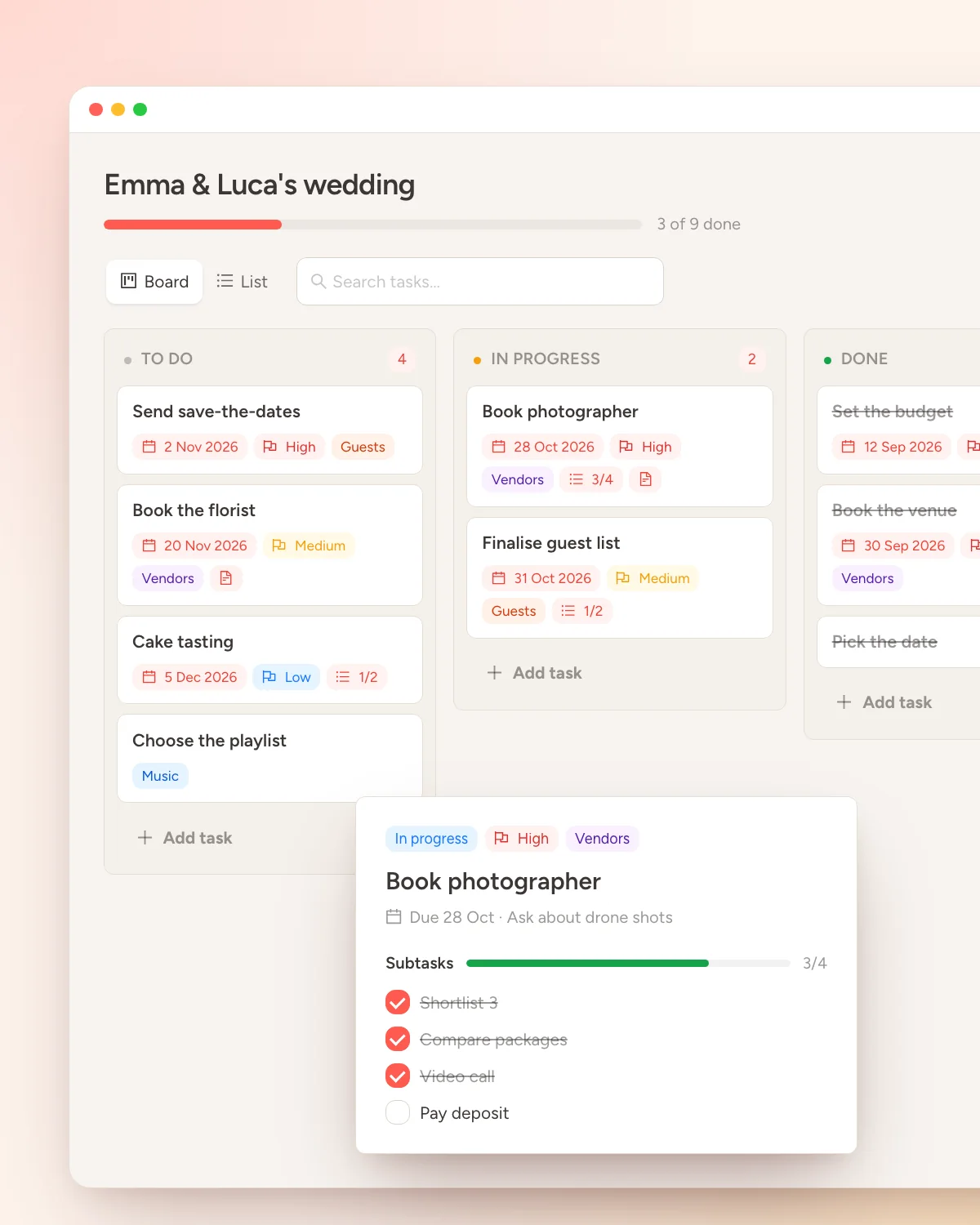
Open any task to add a due date, a priority, a colour label, notes and a list of subtasks. Anything past its date is flagged for you automatically, and search jumps straight to a task.
Step 3
Work the board until it's all Done
Switch between a Kanban board with To do, In progress and Done columns, and a simple list you tick off. Clear completed tasks when a phase is over, and keep a separate board per event.
Why it's here
Planning lives everywhere except in one place.
Most event plans end up spread across a notes app, a spreadsheet, a group chat and a few screenshots. The tasks are all there — you just can't see them together, so something always slips until the week before.
The Dropola checklist is a private planning board that belongs to you, not to an event. Make one for the wedding, one for the rehearsal dinner, one for the office summer party — up to 20 boards, each with room for 300 tasks — and see at a glance what's done, what's in progress and what's still waiting.
It's the same account you'll use for photo sharing on the day, so nothing to install and no separate login. And it's free on every plan, including Free.
What you get
Small tool, built for real planning.
Ready-made templates
Wedding, birthday party and corporate event templates give you the usual tasks in one tap, each already marked with a sensible priority. Rename, reorder or delete whatever doesn't fit.
Kanban or list, your call
Drag cards across To do, In progress and Done, or flip to a plain checklist. Both views show the same tasks, so switch whenever the day calls for it.
Due dates that nag politely
Set a due date and a priority on any task, break it into up to 30 subtasks, and let the board flag what's overdue. Notes and colour labels keep the details together.
Common questions
Answered before you ask.
Is the event checklist really free?
Yes. Boards are part of every Dropola account, including the Free plan. There's no trial period and no card required — sign up and start planning.
Can I use it as a wedding checklist?
That's the most common use. The Wedding template pre-fills the board with the usual tasks — venue, catering, invitations, photographer and so on — and you can add anything specific to your day. Birthday and corporate templates work the same way.
Can I share the board with my partner or a co-planner?
Not yet. Boards are private to the account that created them. If you plan together, share one Dropola login or split the plan into separate boards you each keep.
Do I need to create an event first?
No. Checklists live on your account, not on an event, so you can start planning months before the event page exists. When the day comes, the same account handles guest photo sharing.
More free tools
The rest of the planning kit.
Free on every plan, including Free. No card, no trial clock.
