
Free guest list & RSVP manager
Who's coming, how many, in one list.
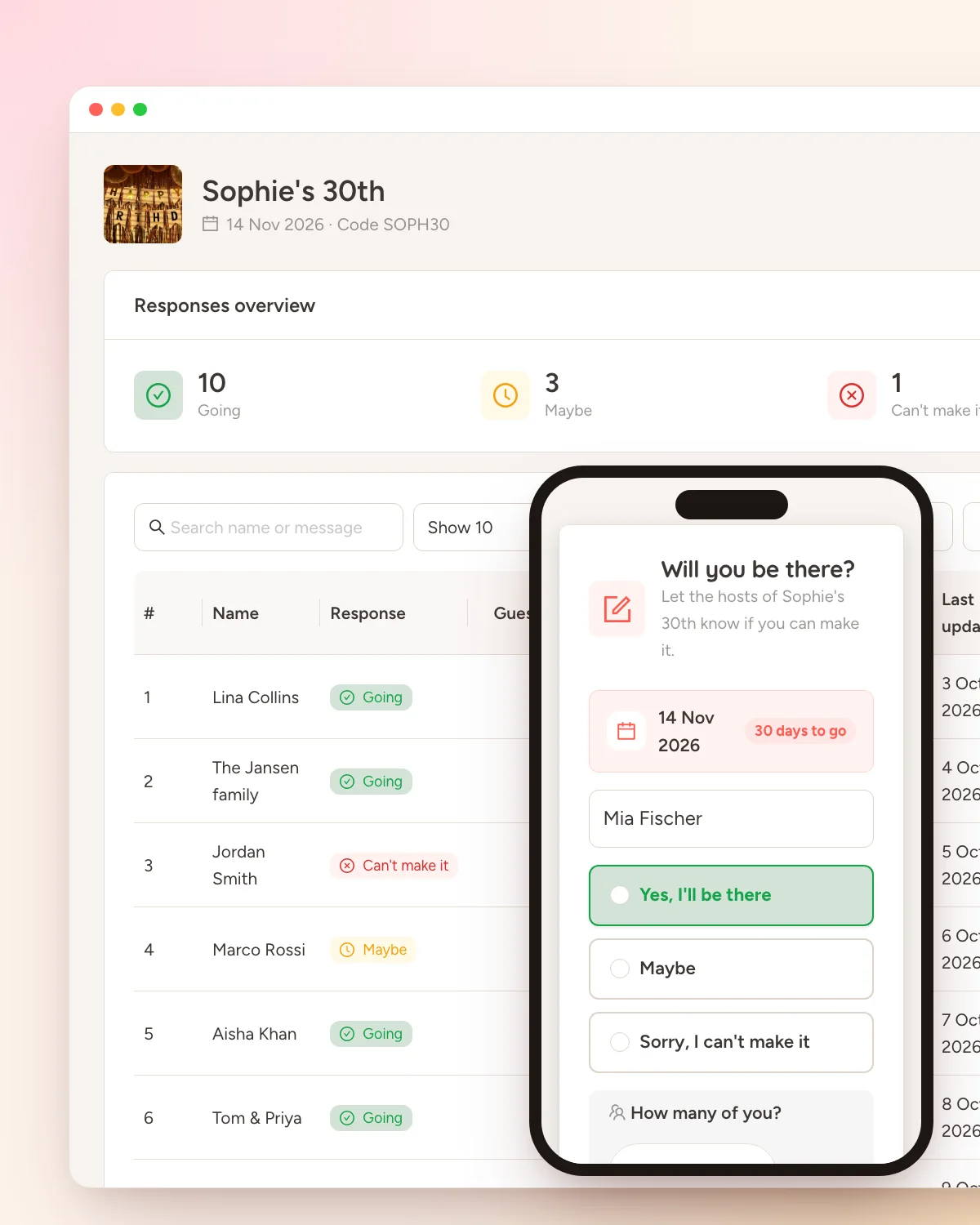
Turn on RSVP for your event and guests reply from the event page in seconds — going, maybe or can't make it, plus how many they're bringing. You get a live headcount, a searchable list and a CSV export. Free with every Dropola account.
Free on every plan, including Free. No card, no trial clock.
How it works
Up and running in a couple of minutes.
Step 1
Switch on RSVP for your event
Create your event and turn on RSVP in its settings. The event page then shows a short reply form — no app and no account for guests, and they can come back and change their answer later.
Step 2
Watch the replies land
Open Guests & RSVPs and pick the event. The overview counts who's going, who's a maybe and who can't make it — counting people, not replies, so a family of four shows as four.
Step 3
Fill the gaps and export
Add guests by hand for replies that arrive by phone or in person, edit or remove any entry, search and filter the list, and download it all as a CSV for the caterer or the seating plan.
Why it's here
The headcount shouldn't live in a group chat.
RSVPs arrive every way at once: a text, a call, a comment under the invite, a cousin who says "we'll see". Keeping the count straight — and knowing how many people that "yes" actually means — is the part of planning nobody enjoys.
With Dropola, the RSVP form is on the same event page guests already use to share photos. They reply with a name, an answer and a party size of up to 20, add a note if they want, and the host list updates immediately. Someone replies by phone? Add them yourself in a few seconds.
Everything is on one screen: totals up top, a searchable list underneath, and a CSV export when it's time to talk to the venue. RSVP is available on every plan, including Free.
What you get
Small tool, built for real planning.
A form guests actually fill in
Name, answer, party size and an optional note — that's the whole form. Guests reply from the event page without an app or an account, and can edit their answer later from the same phone.
A headcount that counts people
The Going and Maybe tiles add up party sizes, not replies. One "going" for four guests shows as four, so the number you give the caterer is the real one.
Search, filter, export
Search by name, filter by answer, choose how many rows to show, and export the whole list as a CSV that opens in any spreadsheet.
Common questions
Answered before you ask.
Is the guest list free?
Yes. RSVP and the guest list come with every event on every plan, including Free. There's no cap on replies beyond what your event allows.
Do guests need an account to RSVP?
No. They open the event page — by scanning the QR code or entering the join code — and reply in the form. If they come back later on the same phone, they can update their answer.
Can I add guests who replied by phone or in person?
Yes. Tap Add guest in the host view to enter a name, answer, party size and note by hand. Manual and guest-submitted entries sit in the same list and count towards the same totals.
Can I export the guest list?
Yes. The Export button downloads every reply — name, answer, party size, note and dates — as a CSV file for Excel, Numbers or Google Sheets.
More free tools
The rest of the planning kit.
Free on every plan, including Free. No card, no trial clock.
